


To understand developer version of create application, it’s very important to think about platform if target is only one platform (iOS/Android). And type (free/paid).
When building apps for Apple and Android app stores. Deciding between “free or paid” apps is one of the toughest decisions for app developers. How can I earn money in the app? Of the millions of apps out there, being discovered by consumers is hard enough. It’s not necessary that free app can’t generate revenue more than paid app. If you have just a few hundred users, you’re not making any significant amount of money. And if you want to depend on ad money for your livelihood, you better have an app that millions of users are actively using.
People want free and ad-supported apps for tablets and smartphones, but many developers still don’t know how to solve the free problem. Deciding when to pay for your app and when to test the support model is one of the toughest decisions a developer has to make.
Even Its not about platform and type , data plays very important role in this. It’s not east to engage user in app “data is the new oil”, keep in mind target audience also.
Few common question to explore before move forward:
1. Is my app engaging enough for people to use it often?
2. How willing are people to pay an up-front fee for my app?
3. How do competitors in my space monetize their apps, and how successful are their strategies?
It’s a choice among four major options:
1. selling your app in the app store
2. offering a free, subscription-supported app
3. offering a free app, with in-app purchases
4. offering a free, ad-supported app
But the choice really boils down to two strategies: getting paid by users or getting paid by advertisers.
To choose any one platform, is more difficult to decide. In comparision of android, iOS developer account is expensive. Lets compare:
Comparison between IOS and Android APP:
| iOS | Android |
| Lengthy app submission process | The submission process is simple. |
| High cost for submission $99/year. | Costs $25 to submit an app. |
| Valuable feedback from the App review team. | Less guidance when an app is rejected, no detailed feedback |
| Getting approval can take a long time. | App approval time is 3-4 days. |
| High competition | The platform is highly fragmented |
Approval Process:
| iOS | Android |
| The approval process can be long and drawn out. | Easy approval process. |
| App approval process is strict, must be aware of the rules and ensure apps are error-free. | Developers are free to experiment and be more creative. |
| Apps are high quality therefore standout | Less high-quality apps can head out to users. |
| Review team gives good and hard-hitting, feedback. | With so many apps let in, it can be hard to stand out. |
Costs:
| Title | iOS | Android |
| App Upload Fee (Developer Account) | $99 annual fee for the Apple Developer Program $299 annual fee for the enterprise version | One-time $25 registration fee for a developer account |
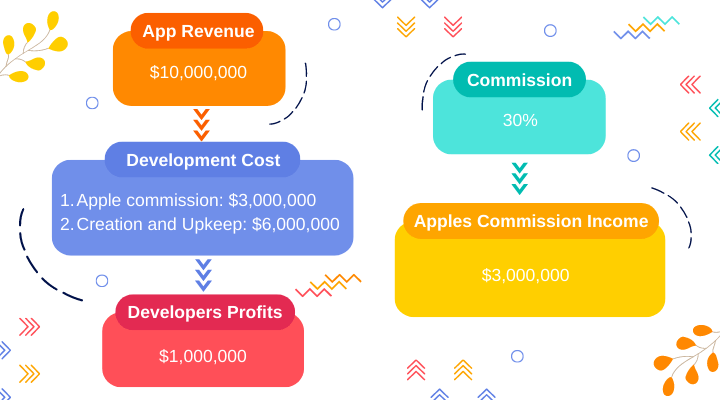
| In-app Purchase | 30% for apps and in-app products 15% for subscriptions after 12 months | 30% for apps and in-app products 15% for subscriptions after 12 months |
Apple App Store
Publish your app on the Apple App Store by following these steps:
1. Submit App Information
2. Create a Bundle Identifier
3. App Store Production Certificate
4. Create a Production Provisioning Profile
5. Create App Store Listing
6. Make the release build
7. Fill in Version Information
8. Submit Version for Review
9. Release the app
Pre collect advance information such as app name and logo, detailed information, classified ads, support, company and privacy URLs, FAQs such as measurement, verification code and the demo code.
Google Play Store
The Google Play Store also has rules and regulations that must be followed to avoid app rejection. Let’s find out how to publish an app on the Google Play Store:
1. Create a Developer Account
2. Create Payments Center Profile
3. Create an App
4. Prepare Store Listing such as graphic assets, languages and translations, product details, categorisation, contact details, privacy policy, and others requirement
5. Upload APK(Android Package Kit) to an App release
6. Provide content rating
7. Set up Pricing and Distribution
8. Rollout Release to Publish Your App
Conclusion
Which is better: Play Store or App Store? This is actually a constant conflict between the two giants in the app development industry. Various applications can be found in the Google Play Store and Apple’s App Store, both of which are growing. Also, app store provides revenue opportunities and great resources for developers, as well as convenience for Android and iOS users. Both these app stores have a lot of good things and some bad things that can be improved. Comparing the Apple App Store vs Google Play Store competition, we can quickly conclude that this is a tie.
Between Free App or Paid App: To decide what to choose, need to carefully analyze all pros and cons of each group and, based on their conclusions, go for that better suits purposes.




28 comments
There is definately a lot to find out about this subject. I like all the points you made
Thanks for the information. Really appreciate!
Very interesting subject, thanks for posting. “I am convinced that life in a physical body is meant to be an ecstatic experience.” by Shakti Gawain.
I just like the helpful information you provide in your articles
This was beautiful Admin. Thank you for your reflections.
Pretty! This has been a really wonderful post. Many thanks for providing these details.
very informative articles or reviews at this time.
very informative articles or reviews at this time.
I am truly thankful to the owner of this web site who has shared this fantastic piece of writing at at this place.
I just like the helpful information you provide in your articles
You’re so awesome! I don’t believe I have read a single thing like that before. So great to find someone with some original thoughts on this topic. Really.. thank you for starting this up. This website is something that is needed on the internet, someone with a little originality!
I like this site very much, Its a really nice situation to read and find information. “The superior man is modest in his speech, but exceeds in his actions.” by Confucius.
I really like reading through a post that can make men and women think. Also, thank you for allowing me to comment!
We are the most professional plastic shredder
This design is steller! You most certainly know how to keep a reader amused. Between your wit and your videos, I was almost moved to start my own blog (well, almost…HaHa!) Excellent job. I really enjoyed what you had to say, and more than that, how you presented it. Too cool!
I appreciate you sharing this blog post. Thanks Again. Cool.
This is my first time pay a quick visit at here and i am really happy to read everthing at one place
Excellent post. I was checking constantly this blog and I’m impressed! Extremely helpful information specially the last part 🙂 I care for such info much. I was seeking this particular information for a very long time. Thank you and good luck.
Very well presented. Every quote was awesome and thanks for sharing the content. Keep sharing and keep motivating others.
Very well presented. Every quote was awesome and thanks for sharing the content. Keep sharing and keep motivating others.
I’ve bookmarked this site for future reference. It’s a valuable resource worth revisiting.
I just wanted to express my gratitude for this post. It has been immensely helpful in solving a problem I was facing. Thank you for sharing your knowledge and expertise!
I truly appreciate your technique of writing a blog. I added it to my bookmark site list and will
You’re so awesome! I don’t believe I have read a single thing like that before. So great to find someone with some original thoughts on this topic. Really.. thank you for starting this up. This website is something that is needed on the internet, someone with a little originality!
A person essentially help to make seriously posts I’d state. This is the very first time I frequented your web page and to this point? I surprised with the analysis you made to make this particular publish extraordinary. Fantastic job!
This is really interesting, You’re a very skilled blogger. I’ve joined your feed and look forward to seeking more of your magnificent post. Also, I’ve shared your site in my social networks!
Mind blown! Your expertise shines through this article.
Thank you so much for posting this blog! It’s always great to see what people have to say about different topics, and it’s even better when it’s something that you personally find interesting. It’s amazing how much knowledge and insight can be gained from reading other people’s thoughts and opinions. I’m so glad that you decided to share your thoughts with the world, and I’m sure that